<?xml version="1.0" encoding="utf-8"?>
<feed xmlns="http://www.w3.org/2005/Atom">
	<title type="html"><![CDATA[Redump Forum — Question about dumping a PS1 game's music CD]]></title>
	<link rel="self" href="http://forum.redump.org/feed/atom/topic/6730/" />
	<updated>2010-06-09T22:19:41Z</updated>
	<generator version="1.4.4">PunBB</generator>
	<id>http://forum.redump.org/topic/6730/question-about-dumping-a-ps1-games-music-cd/</id>
		<entry>
			<title type="html"><![CDATA[Re: Question about dumping a PS1 game's music CD]]></title>
			<link rel="alternate" href="http://forum.redump.org/post/26533/#p26533" />
			<content type="html"><![CDATA[<p>Excellent explanation! Thank you so much for taking the time to explain it! <img src="http://forum.redump.org/img/smilies/smile.png" width="15" height="15" alt="smile" /> <br />EAC was detecting the gaps correctly. I wouldn&#039;t be so paranoid about trusting EAC but it sometimes mis-detects gaps on 2 out of 3 of the drives I&#039;m using. For Magic the Gathering that I just submitted, it detected track2&#039;s gap as 2:00 on one of my drives and 7 something on a different drive (7 was correct). </p><p>Anyways, I finally got Rhapsody&#039;s sound track submitted and all my checks seemed to come out correct- yay!.<br />The information here will help me a lot in the future <img src="http://forum.redump.org/img/smilies/smile.png" width="15" height="15" alt="smile" /></p>]]></content>
			<author>
				<name><![CDATA[HwitVlf]]></name>
				<uri>http://forum.redump.org/user/8465/</uri>
			</author>
			<updated>2010-06-09T22:19:41Z</updated>
			<id>http://forum.redump.org/post/26533/#p26533</id>
		</entry>
		<entry>
			<title type="html"><![CDATA[Re: Question about dumping a PS1 game's music CD]]></title>
			<link rel="alternate" href="http://forum.redump.org/post/26510/#p26510" />
			<content type="html"><![CDATA[<p>Here&#039;s a subcode example from an audio CD.</p><p><span class="postimg"><img src="http://i48.tinypic.com/2vaifz9.png" alt="http://i48.tinypic.com/2vaifz9.png" /></span></p><p>We can see the first three frames in the picture belong to track 2 (the Q-TNO), and that they are at the end of the song (see the time increasing 3:44.35, 36, 37.)</p><p>At frame 31434, we jump to Track 3&#039;s pregap. The Q-Index is 0, indicating we are in the pregap, and the time starts counting down from 1.28.</p><p>Frame 31536 is the last in the pregap, as we go to Q-Index 1 afterwards. In this instance, the pregap has counted down to Frame 1, but it can also count down to 0, like this:</p><p><a href="http://i47.tinypic.com/10cubfk.png"><span class="postimg"><img src="http://i47.tinypic.com/10cubfk.png" alt="http://i47.tinypic.com/10cubfk.png" /></span></a><br />(Basically, don&#039;t assume the pregap length based on the countdown start)</p><p>Now we know that the pregap starts at 31434 and ends at 31536. Subtracting 31433 from 31536 gives us a pregap of 103 frames, or 1.28. This coincides with the cuesheet generated by Subcode Analyzer and EAC&#039;s gap detection.</p><div class="codebox"><pre><code>  TRACK 03 AUDIO
    ISRC GBJG00500048
    INDEX 00 06:59:08
    INDEX 01 07:00:36</code></pre></div><p><span class="postimg"><img src="http://i50.tinypic.com/120gqw4.png" alt="http://i50.tinypic.com/120gqw4.png" /></span></p><p>P normally indicates the track start, but in this case it started 47 frames early. The subcode dictates that those frames belong to the end of track 2 though, not track 3.</p>]]></content>
			<author>
				<name><![CDATA[velocity37]]></name>
				<uri>http://forum.redump.org/user/10769/</uri>
			</author>
			<updated>2010-06-09T03:57:06Z</updated>
			<id>http://forum.redump.org/post/26510/#p26510</id>
		</entry>
		<entry>
			<title type="html"><![CDATA[Re: Question about dumping a PS1 game's music CD]]></title>
			<link rel="alternate" href="http://forum.redump.org/post/26508/#p26508" />
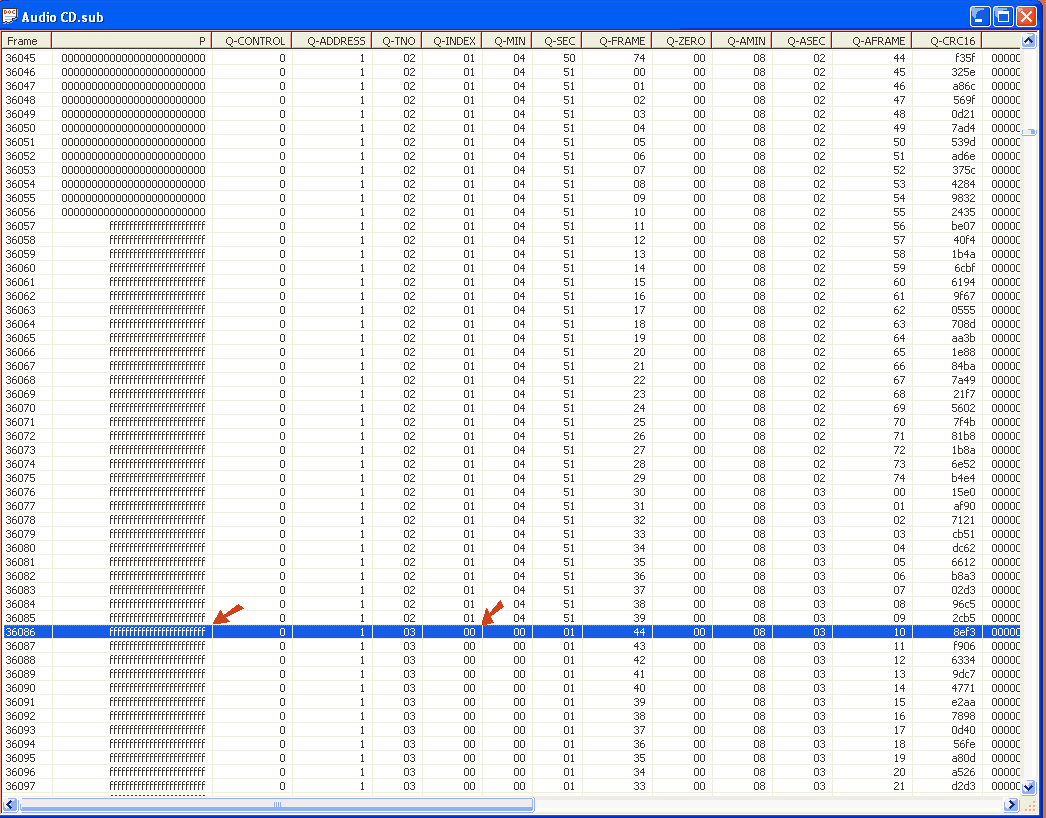
			<content type="html"><![CDATA[<p>Do I check the &#039;lead-in and lead-out area&#039; by looking at the first and last sectors in ISOBuster?</p><p>On Rhapsody&#039;s music CD, both Subchannel Analyzer and EAC seem to be measuring the gap by counting the frames that have a Q-Index &#039;0&#039; combined with a P of &#039;FF&#039; (i.e. 120 lines =1.45 gap etc), but they aren&#039;t counting the frames immediately above that have a Q-Index &#039;1&#039; and a P of &#039;FF&#039; (see picture I posted above). That means they&#039;re detecting the gap correctly right?&nbsp; I only wonder because if the &#039;1+ff&#039; frames are included in the gap with the &#039;0+ff&#039; frames, their total becomes 150 which seems suspiciously close to a standard 2 second gap.</p>]]></content>
			<author>
				<name><![CDATA[HwitVlf]]></name>
				<uri>http://forum.redump.org/user/8465/</uri>
			</author>
			<updated>2010-06-08T22:44:17Z</updated>
			<id>http://forum.redump.org/post/26508/#p26508</id>
		</entry>
		<entry>
			<title type="html"><![CDATA[Re: Question about dumping a PS1 game's music CD]]></title>
			<link rel="alternate" href="http://forum.redump.org/post/26472/#p26472" />
			<content type="html"><![CDATA[<p>@F1ReB4LL</p><p>Thanks, good to know. I didn&#039;t mean to spread misinformation, I just wanted him to know there&#039;s no disc offset hunting involved in audio CDs.</p><div class="quotebox"><cite>HwitVlf wrote:</cite><blockquote><p>The first frame with Q-INDEX of 0 is well into the &#039;frames with mostly fs&#039; instead of the first&nbsp; having a &#039;P of 0s&#039;. Should I just ignore this and trust EAC&#039;s/SubAn&#039;s gap analysis?</p></blockquote></div><p>Sorry about that. This was the case in the all of discs I had looked at, but I dumped more subs and found exceptions. The Q-INDEX and Q-Frame sequence is what matters.</p><p><span class="postimg"><img src="http://i48.tinypic.com/33os4fq.png" alt="http://i48.tinypic.com/33os4fq.png" /></span></p>]]></content>
			<author>
				<name><![CDATA[velocity37]]></name>
				<uri>http://forum.redump.org/user/10769/</uri>
			</author>
			<updated>2010-06-06T22:41:27Z</updated>
			<id>http://forum.redump.org/post/26472/#p26472</id>
		</entry>
		<entry>
			<title type="html"><![CDATA[Re: Question about dumping a PS1 game's music CD]]></title>
			<link rel="alternate" href="http://forum.redump.org/post/26470/#p26470" />
			<content type="html"><![CDATA[<div class="quotebox"><cite>velocity37 wrote:</cite><blockquote><p>Audio CDs don&#039;t have a disc offset, so only your drive&#039;s offset matters.</p></blockquote></div><p>They do, we just unable to determine it. Basically, yes, you should dump it with your drive&#039;s offset, but it would be better to check the lead-in and lead-out areas, some non-zero bytes can present there, if so - tweak the offset value to include ALL the data.</p>]]></content>
			<author>
				<name><![CDATA[F1ReB4LL]]></name>
				<uri>http://forum.redump.org/user/13/</uri>
			</author>
			<updated>2010-06-06T20:19:21Z</updated>
			<id>http://forum.redump.org/post/26470/#p26470</id>
		</entry>
		<entry>
			<title type="html"><![CDATA[Re: Question about dumping a PS1 game's music CD]]></title>
			<link rel="alternate" href="http://forum.redump.org/post/26469/#p26469" />
			<content type="html"><![CDATA[<p>SuibChannel Analyzer detects the same gaps as EAC, but the subchannel view doesn&#039;t seem to match what you describe but maybe I&#039;m misunderstanding something. </p><p>The first frame with Q-INDEX of 0 is well into the &#039;frames with mostly fs&#039; instead of the first&nbsp; having a &#039;P of 0s&#039;. Should I just ignore this and trust EAC&#039;s/SubAn&#039;s gap analysis?</p><p><span class="postimg"><img src="http://i22.photobucket.com/albums/b324/weissvulf/Sub.png" alt="http://i22.photobucket.com/albums/b324/weissvulf/Sub.png" /></span></p>]]></content>
			<author>
				<name><![CDATA[HwitVlf]]></name>
				<uri>http://forum.redump.org/user/8465/</uri>
			</author>
			<updated>2010-06-06T19:40:23Z</updated>
			<id>http://forum.redump.org/post/26469/#p26469</id>
		</entry>
		<entry>
			<title type="html"><![CDATA[Re: Question about dumping a PS1 game's music CD]]></title>
			<link rel="alternate" href="http://forum.redump.org/post/26424/#p26424" />
			<content type="html"><![CDATA[<div class="quotebox"><cite>HwitVlf wrote:</cite><blockquote><p>So a CD&#039;s offset is basically a data shift distance that occurs between the data track and audio tracks, but not on data-only or audio-only CDs?</p></blockquote></div><p>Any disc with a data track will have one, including data-only. Data tracks have their offset handled automatically out of necessity.</p><div class="quotebox"><cite>HwitVlf wrote:</cite><blockquote><p>EAC shows irregular gaps (1.45, 2.43 etc) on the CD tracks;&nbsp; is that normal?</p></blockquote></div><p>Discs can have crazy gaps, but you can check them yourself.</p><p>Dump the disc with CloneCD and check the sub in <a href="http://forum.redump.org/topic/5272/tools-of-the-trade/">Subcode analyzer</a>. Gap frames are going to have a Q-INDEX of 0. The first in a set will have a P of 0s, followed by followed by frames with mostly/all fs. The Q-Frame sequence will also be linear across the frames. Subcode analyzer can make a cuesheet for you, which will show you the gaps. There are 75 sectors per second (4500/min), which enumerates like 0.73 0.74 1.00. Remember that when you&#039;re trying to translate sectors to seconds and vice versa.</p><div class="quotebox"><cite>HwitVlf wrote:</cite><blockquote><p>Except for the last track (which gets a sync error) , I get no errors and identical CRCs on all the tracks from both dumps. Is there a way to manually dump the last track in ISO buster?</p></blockquote></div><p>If one of your drives can over-read, then sure. Pop up the sector viewer and try to view a sector past the last, if you get data instead of an error code, you&#039;re good to go.</p><p>Assuming the drive&#039;s offset is &gt;0 and &lt;+588: Extract from-to the track, set a fixed end address, subtract the pregap length in sectors from the start address, and set the end address to +1. Hex edit the resulting file, deleting the first (drive offset*4) bytes from the beginning and (2352-(drive offset*4)) bytes from the end.</p><p>Now if you want to verify that track on a drive that can&#039;t over-read, do the same without adding +1 to the end address. Delete (drive offset*4) bytes from the beginning, but add that many bytes of 00 to the end. So if your drive had an offset of +12, you&#039;d delete the first 48 bytes, and add 48 bytes of 00 to the end. Since the drive can&#039;t over-read, you&#039;ll want to first verify that the truncated bytes are indeed 00, otherwise you risk losing data.</p>]]></content>
			<author>
				<name><![CDATA[velocity37]]></name>
				<uri>http://forum.redump.org/user/10769/</uri>
			</author>
			<updated>2010-06-05T08:42:50Z</updated>
			<id>http://forum.redump.org/post/26424/#p26424</id>
		</entry>
		<entry>
			<title type="html"><![CDATA[Re: Question about dumping a PS1 game's music CD]]></title>
			<link rel="alternate" href="http://forum.redump.org/post/26416/#p26416" />
			<content type="html"><![CDATA[<p>Thanks again for the help Velocity <img src="http://forum.redump.org/img/smilies/smile.png" width="15" height="15" alt="smile" /><br />So a CD&#039;s offset is basically a data shift distance that occurs between the data track and audio tracks, but not on data-only or audio-only CDs?</p><p>I see other PS sound tracks in the database so I figured out that question myself.</p><br /><p>EDIT: A couple more questions-&nbsp; <br />EAC shows irregular gaps (1.45, 2.43 etc) on the CD tracks;&nbsp; is that normal?<br />Except for the last track (which gets a sync error) , I get no errors and identical CRCs on all the tracks from both dumps. Is there a way to manually dump the last track in ISO buster?</p>]]></content>
			<author>
				<name><![CDATA[HwitVlf]]></name>
				<uri>http://forum.redump.org/user/8465/</uri>
			</author>
			<updated>2010-06-05T02:55:58Z</updated>
			<id>http://forum.redump.org/post/26416/#p26416</id>
		</entry>
		<entry>
			<title type="html"><![CDATA[Re: Question about dumping a PS1 game's music CD]]></title>
			<link rel="alternate" href="http://forum.redump.org/post/26415/#p26415" />
			<content type="html"><![CDATA[<p>For audio CDs, just use your drive&#039;s offset. Audio CDs don&#039;t have a disc offset, so only your drive&#039;s offset matters.</p>]]></content>
			<author>
				<name><![CDATA[velocity37]]></name>
				<uri>http://forum.redump.org/user/10769/</uri>
			</author>
			<updated>2010-06-05T02:11:26Z</updated>
			<id>http://forum.redump.org/post/26415/#p26415</id>
		</entry>
		<entry>
			<title type="html"><![CDATA[Question about dumping a PS1 game's music CD]]></title>
			<link rel="alternate" href="http://forum.redump.org/post/26414/#p26414" />
			<content type="html"><![CDATA[<p>Is redump recording info for music cds that came with Playstation1 games- specifically, I&#039;m wondering about the music CD that came with Rhapsody A Musical Adventure.<br />If redump is covering music CDs, is there a guide about getting an accurate dump. If I understand correctly, you can&#039;t dump a music CD unless you know its offset and you can&#039;t figure out the offset unless you have you have a drive that supports px_d8.</p>]]></content>
			<author>
				<name><![CDATA[HwitVlf]]></name>
				<uri>http://forum.redump.org/user/8465/</uri>
			</author>
			<updated>2010-06-05T01:09:11Z</updated>
			<id>http://forum.redump.org/post/26414/#p26414</id>
		</entry>
</feed>