<?xml version="1.0" encoding="utf-8"?>
<feed xmlns="http://www.w3.org/2005/Atom">
	<title type="html"><![CDATA[Redump Forum — Need help with dumping]]></title>
	<link rel="self" href="http://forum.redump.org/feed/atom/topic/5951/" />
	<updated>2010-04-30T05:12:55Z</updated>
	<generator version="1.4.4">PunBB</generator>
	<id>http://forum.redump.org/topic/5951/need-help-with-dumping/</id>
		<entry>
			<title type="html"><![CDATA[Re: Need help with dumping]]></title>
			<link rel="alternate" href="http://forum.redump.org/post/25398/#p25398" />
			<content type="html"><![CDATA[<p>Well do I feel like an idiot right about now lol, velocity37 was right I was just on the wrong tab&nbsp; &nbsp;<img src="http://forum.redump.org/img/smilies/tongue.png" width="15" height="15" alt="tongue" /> </p><p>Thank you all for the suggestions, that corrected the problem. All four of my drives work correctly now.</p><div class="quotebox"><cite>velocity37 wrote:</cite><blockquote><p>Also, does that Plextor work with <a href="http://forum.redump.org/topic/2468/offset-detection-using-the-d8-read-command/">px_d8</a>? If it does, you&#039;ll no longer have to count garbage data, and you can get the offset of data-only discs&nbsp; <img src="http://forum.redump.org/img/smilies/big_smile.png" width="15" height="15" alt="big_smile" /></p></blockquote></div><p>Holy crap that is an awesome program and yes my Plextor works with it so feel free to update your post with my drive information&nbsp; &nbsp;PLEXTOR DVDR PX-708A&nbsp; &nbsp;+30</p><p>I also tested the following drives and they do not work (an error appeared when I tried to run the file)</p><p>- Light Scribe GSA-H55L&nbsp; +102<br />- TSSTcorp SH-S223L&nbsp; +6<br />- SAMSUNG DVD-ROM SD-616F&nbsp; +1182</p><br /><p>But I&#039;m glad I have one drive that can handle this nifty little program.</p><p>Thanks again for all your help guys!</p>]]></content>
			<author>
				<name><![CDATA[Specialt1212]]></name>
				<uri>http://forum.redump.org/user/8168/</uri>
			</author>
			<updated>2010-04-30T05:12:55Z</updated>
			<id>http://forum.redump.org/post/25398/#p25398</id>
		</entry>
		<entry>
			<title type="html"><![CDATA[Re: Need help with dumping]]></title>
			<link rel="alternate" href="http://forum.redump.org/post/25395/#p25395" />
			<content type="html"><![CDATA[<div class="quotebox"><cite>Specialt1212 wrote:</cite><blockquote><p>I tried setting them up in EAC per the guide but I&#039;m having a problem when I get to this step</p><div class="codebox"><pre><code>- Open the drive options (EAC -&gt; Drive Options or press F10);
- Select the first tab (&quot;Extraction Method&quot;) and click on &quot;Detect Read Features&quot;;
- EAC should now start detecting the features of your drive;</code></pre></div></blockquote></div><p>In your screenshots, you&#039;re in the offset/speed tab, not the extraction method tab. The extraction method tab is where you set it to secure mode, and detect whether your drive has accurate stream, an audio cache, and C2 pointers.</p><p>If you&#039;re wanting to check the offset of your drive manually, just count the lines of garbage data on an disc you&#039;ve already dumped.</p><p>Also, does that Plextor work with <a href="http://forum.redump.org/topic/2468/offset-detection-using-the-d8-read-command/">px_d8</a>? If it does, you&#039;ll no longer have to count garbage data, and you can get the offset of data-only discs&nbsp; <img src="http://forum.redump.org/img/smilies/big_smile.png" width="15" height="15" alt="big_smile" /></p>]]></content>
			<author>
				<name><![CDATA[velocity37]]></name>
				<uri>http://forum.redump.org/user/10769/</uri>
			</author>
			<updated>2010-04-29T23:46:28Z</updated>
			<id>http://forum.redump.org/post/25395/#p25395</id>
		</entry>
		<entry>
			<title type="html"><![CDATA[Re: Need help with dumping]]></title>
			<link rel="alternate" href="http://forum.redump.org/post/25389/#p25389" />
			<content type="html"><![CDATA[<p>Try some well known audio CD, it should be in DB for sure.</p><p>About updating EAC, I don&#039;t know if the canged anything or if they add new features as I haven&#039;t updated it yet.</p>]]></content>
			<author>
				<name><![CDATA[Rocknroms]]></name>
				<uri>http://forum.redump.org/user/4288/</uri>
			</author>
			<updated>2010-04-29T20:19:02Z</updated>
			<id>http://forum.redump.org/post/25389/#p25389</id>
		</entry>
		<entry>
			<title type="html"><![CDATA[Re: Need help with dumping]]></title>
			<link rel="alternate" href="http://forum.redump.org/post/25386/#p25386" />
			<content type="html"><![CDATA[<p>Everything&#039;s fine, the CD doesn&#039;t have to be in the database, in fact, I don&#039;t think any CD is. (lol).<br />You don&#039;t have to resolve this.</p>]]></content>
			<author>
				<name><![CDATA[RiMMER]]></name>
				<uri>http://forum.redump.org/user/7363/</uri>
			</author>
			<updated>2010-04-29T19:57:00Z</updated>
			<id>http://forum.redump.org/post/25386/#p25386</id>
		</entry>
		<entry>
			<title type="html"><![CDATA[Re: Need help with dumping]]></title>
			<link rel="alternate" href="http://forum.redump.org/post/25381/#p25381" />
			<content type="html"><![CDATA[<p>I&#039;ve been searching the internet and still can&#039;t seem to find a solution to the above problem....</p><p>But another </p><p>The guide here on Redump.org says I should be using ExactAudioCopy V0.99 Prebeta 4, which I am.</p><p>I noticed that <a href="http://www.exactaudiocopy.de/en/index.php/resources/download/">V0.99 prebeta 5</a> is out now, so should I upgrade? Do you think this may fix the above problem?</p>]]></content>
			<author>
				<name><![CDATA[Specialt1212]]></name>
				<uri>http://forum.redump.org/user/8168/</uri>
			</author>
			<updated>2010-04-29T19:05:51Z</updated>
			<id>http://forum.redump.org/post/25381/#p25381</id>
		</entry>
		<entry>
			<title type="html"><![CDATA[Re: Need help with dumping]]></title>
			<link rel="alternate" href="http://forum.redump.org/post/25354/#p25354" />
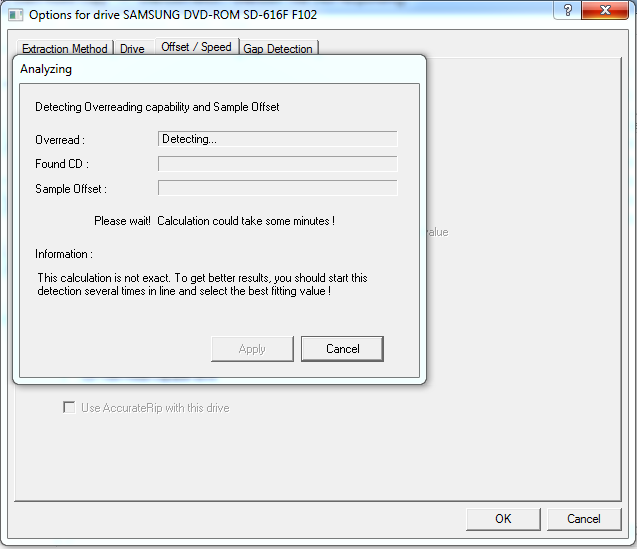
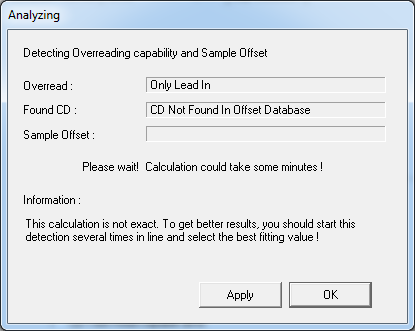
			<content type="html"><![CDATA[<p>Thanks for the help, that will allow me to dump another 10 or so PSX games!</p><p>So I just found two <strong>really</strong> cheap drives that I picked up and installed in my computer (serious about $5 each)</p><p>SAMSUNG - DVD-ROM SD-616F&nbsp; &nbsp; with a +1182 offset<br />PLEXTOR - DVDR PX-708A&nbsp; &nbsp; &nbsp; &nbsp; &nbsp; &nbsp;with a +30 offset</p><p>I tried setting them up in EAC per the guide but I&#039;m having a problem when I get to this step</p><div class="codebox"><pre><code>- Open the drive options (EAC -&gt; Drive Options or press F10);
- Select the first tab (&quot;Extraction Method&quot;) and click on &quot;Detect Read Features&quot;;
- EAC should now start detecting the features of your drive;</code></pre></div><p>They are both installed properly and working but when I do the above step it shows this message first</p><p><span class="postimg"><img src="http://i41.photobucket.com/albums/e295/Specialt1212/Untitled-1copy-24.png" alt="http://i41.photobucket.com/albums/e295/Specialt1212/Untitled-1copy-24.png" /></span></p><p>Then is shows this message</p><p><span class="postimg"><img src="http://i41.photobucket.com/albums/e295/Specialt1212/Untitled-2copy-10.png" alt="http://i41.photobucket.com/albums/e295/Specialt1212/Untitled-2copy-10.png" /></span></p><br /><p>Why does it keep saying that <strong>CD Not Found In Offset Database</strong>?</p><p>When I set my other two drives up it took a couple of minutes but after it was done analyzing the drive it found the offset sample and asked if I wanted to submit it to the database.</p><p>I&#039;ve tried several video game &amp; music cd&#039;s but none seem to work. I even tried two of the discs that are listed on the EAC page.</p><p>Can anyone help me set this drive up?</p>]]></content>
			<author>
				<name><![CDATA[Specialt1212]]></name>
				<uri>http://forum.redump.org/user/8168/</uri>
			</author>
			<updated>2010-04-29T13:12:29Z</updated>
			<id>http://forum.redump.org/post/25354/#p25354</id>
		</entry>
		<entry>
			<title type="html"><![CDATA[Re: Need help with dumping]]></title>
			<link rel="alternate" href="http://forum.redump.org/post/25296/#p25296" />
			<content type="html"><![CDATA[<div class="quotebox"><cite>Specialt1212 wrote:</cite><blockquote><p>1. Why would I be getting that error</p><p>2. Should I even be going back more than 150 sectors on 2 track discs?</p><br /><p>I want to make sure I&#039;m doing this correctly because I have 5 or 6 games that aren&#039;t in the database that I want to dump, but I want to make sure I&#039;m doing it correctly.</p></blockquote></div><p>1. Some drives will lock up when trying to read the last data sector. My PX-760A does this, but my GH20NS15 can read them like a charm. Thus, the sector it freezes up on is a data sector. Count the sector after that as the first sector of garbage data. If you don&#039;t see a sector with garbage data after that sector, it means the combined offset is &lt;= 0, so you can&#039;t determine it. When the drive locks up, just eject the drive tray to unfreeze it.</p><p>2. Yes, because the track 2 pregap isn&#039;t always two seconds. I&#039;ve recently ran into a couple of discs where the gap was four seconds (300 sectors). If you find the garbage data, you&#039;re done, but some discs have strange gaps instead of easy peasy uniform two second gaps.</p>]]></content>
			<author>
				<name><![CDATA[velocity37]]></name>
				<uri>http://forum.redump.org/user/10769/</uri>
			</author>
			<updated>2010-04-28T02:11:43Z</updated>
			<id>http://forum.redump.org/post/25296/#p25296</id>
		</entry>
		<entry>
			<title type="html"><![CDATA[Re: Need help with dumping]]></title>
			<link rel="alternate" href="http://forum.redump.org/post/25292/#p25292" />
			<content type="html"><![CDATA[<p>Thanks for the help your explanation worked for dumping 2 track games :-)</p><p>I have another question for you though. </p><br /><p>Since EAC won&#039;t detect the pregap length we have to determine that manually in IsoBuster, so lets use <a href="http://redump.org/disc/3379/">Castlevania: Symphony of the Night</a> for our test.</p><p>When I open track 2 in IsoBuster and go back 150 sectors I see two full rows of garbage, which is correct but if we pretend this game wasn&#039;t already dumped I&#039;m suppose to go back another page to determine if the previous page is full of garbage or just header info correct?</p><p>So if I go back another page, I get the following error...</p><div class="codebox"><pre><code>device reported error code : 03/11/00</code></pre></div><p>I ignored the error and dumped my copy of Castlevania which ended up matching the info in the database exactly.</p><br /><p>1. Why would I be getting that error</p><p>2. Should I even be going back more than 150 sectors on 2 track discs?</p><br /><p>I want to make sure I&#039;m doing this correctly because I have 5 or 6 games that aren&#039;t in the database that I want to dump, but I want to make sure I&#039;m doing it correctly.</p>]]></content>
			<author>
				<name><![CDATA[Specialt1212]]></name>
				<uri>http://forum.redump.org/user/8168/</uri>
			</author>
			<updated>2010-04-27T22:43:17Z</updated>
			<id>http://forum.redump.org/post/25292/#p25292</id>
		</entry>
		<entry>
			<title type="html"><![CDATA[Re: Need help with dumping]]></title>
			<link rel="alternate" href="http://forum.redump.org/post/25113/#p25113" />
			<content type="html"><![CDATA[<p>You&#039;d open Track 2 in the hex editor, but you don&#039;t have to do this if you&#039;re uncomfortable with it.</p><p>In EAC, don&#039;t detect gaps, instead leave them undetected. Enter the offset in the drive options as you would normally, and dump the track with test &amp; copy. This will give you track 2 without its pregap.</p><p>Use psxt001z.exe to generate your pregap using: psxt001z.exe --gen pregap.bin 352800</p><p>Use the command prompt to merge the files, like: copy /b pregap.bin+track02.bin track02good.bin</p><p>That will give you your track 2 with a 2 second pregap.</p>]]></content>
			<author>
				<name><![CDATA[velocity37]]></name>
				<uri>http://forum.redump.org/user/10769/</uri>
			</author>
			<updated>2010-04-24T04:34:10Z</updated>
			<id>http://forum.redump.org/post/25113/#p25113</id>
		</entry>
		<entry>
			<title type="html"><![CDATA[Re: Need help with dumping]]></title>
			<link rel="alternate" href="http://forum.redump.org/post/25111/#p25111" />
			<content type="html"><![CDATA[<p>I just ran into a game with this same problem (Monster Rancher), it only has two tracks.... </p><p>I extracted the first track like normal then I opened the sector viewer of track 2 in IsoBuster and subtracted 150 from the starting point of 138340 which was 138190 and determined it has a pregap of 2 seconds or 2 full rows or garbage which meant 150 * 2352 = 352800</p><p>Now should I use the resize (FPCopy) and psxt001z tool on the track01.bin file and do the typical </p><p>- FPCopy64 -r &quot;track01.bin&quot; -352800<br />- psxt001z.exe --fix &quot;track01.bin&quot;</p><p>Also what file should I be editing with the hex editor track01.bin?</p><p>Lastly do I extract the audio with EAC or Isobuster?</p>]]></content>
			<author>
				<name><![CDATA[Specialt1212]]></name>
				<uri>http://forum.redump.org/user/8168/</uri>
			</author>
			<updated>2010-04-24T02:47:55Z</updated>
			<id>http://forum.redump.org/post/25111/#p25111</id>
		</entry>
		<entry>
			<title type="html"><![CDATA[Re: Need help with dumping]]></title>
			<link rel="alternate" href="http://forum.redump.org/post/24131/#p24131" />
			<content type="html"><![CDATA[<p>Rocket, just remember that the biohazard 3 trial dump you did is <strong>CORRECT</strong>.</p><p>I am sure of it, trust me, I&#039;m too much of a hardcore fan of the series to know. There&#039;s nothing more to be done about that dump.</p>]]></content>
			<author>
				<name><![CDATA[RiMMER]]></name>
				<uri>http://forum.redump.org/user/7363/</uri>
			</author>
			<updated>2010-03-16T02:33:30Z</updated>
			<id>http://forum.redump.org/post/24131/#p24131</id>
		</entry>
		<entry>
			<title type="html"><![CDATA[Re: Need help with dumping]]></title>
			<link rel="alternate" href="http://forum.redump.org/post/24130/#p24130" />
			<content type="html"><![CDATA[<p>That&#039;s a &quot;fun&quot; EAC bug where 2 track data+audio discs will have bad gap detection. You can add the pregap manually, or dump the whole entire track manually with ISOBuster.</p><p>Anyways, here&#039;s what you can do to solve this:</p><p><strong>The easy way:</strong><br />Dump the disc as normal. The resulting track will be missing the pregap (since it was determined gapless). </p><p>The gap is probably two seconds. So what you&#039;ll want to do is use ISOBuster, right-click track 2 and go into the sector view. Subtract 149 from the sector counter in the box. Now hit the back arrow once (a total of 150) and you should see some garbage data followed by many 00s (This is the same process as the guide &quot;Determining the (factory) write offset&quot;). So, take the number of sectors there are from the start of the track to the garbage data (150 most of the time, or what you determined yourself) and multiply that by 2352.</p><p>Grab a hex editor (like <a href="http://www.chmaas.handshake.de/delphi/freeware/xvi32/xvi32.htm">XVI32</a>). Now, edit&gt;insert string. Click &quot;Hex string&quot; and type 00. Under &quot;Insert &lt;n&gt; times&quot; hit decimal and put the number you did earlier. We&#039;ve now successfully added the missing pregap, so all should be well if no mistakes were made.</p><p><strong>The hard way:</strong><br />[ISOBuster completely manual, not really that hard once you&#039;re used to it.</p><p>First, we need to determine the pregap length. The gap is probably two seconds. So what you&#039;ll want to do is use ISOBuster, right-click track 2 and go into the sector view. Subtract 149 from the sector counter in the box. Now hit the back arrow once (a total of 150) and you should see some garbage data followed by many 00s (This is the same process as the guide &quot;Determining the (factory) write offset&quot;).</p><p>So, take the number of sectors there are from the start of the track to the garbage data (150 most of the time, or what you determined yourself) and multiply that by 2352. Note this for later, denote as &quot;gap length, bytes&quot;. You can also dump the disc with Slysoft CloneCD and run the resulting sub through <a href="http://www.cdmediaworld.com/cgi-bin/dl.cgi?f=sca073!lzh">Subcode analyzer</a> to have the gap length automatically determined (in seconds).</p><p>Now, ISOBuster doesn&#039;t give us offset correction, so we will have to do that manually. Look at the sector with garbage data and determine the combined offset (as per the guide). Because the data is going to be pushed forward or backward, we have to dump an extra sector worth of data. So right-click the track and click extract from-to. The start sector depends on the combined offset. If your offset is &lt;-588 or &gt;588, you&#039;ll divide it by 588, round up (or down if negative offset) (-617 would be -2, +1566 would be +3, etc), and start dumping that many sectors early or late. Unless the offset is evenly divisible by 588, we will need to add +1 to the length.</p><p>In the unlikely event that the combined offset is evenly divisible by 588, we don&#039;t have to trim. Otherwise:<br />Let us pretend that we determined the combined offset to be +32 (+2 disc, +30 drive). What we&#039;ll do is open the Track 2 bin in a hex editor (such as <a href="http://www.chmaas.handshake.de/delphi/freeware/xvi32/xvi32.htm">XVI32</a>). Now, because the offset is positive, the data will be pushed forward (if the offset was negative, it&#039;d be pushed backward, so we subtract 2352 from offset*4 until we get a negative result. Convert to positive, and that&#039;s the 00 bytes to skip). There are 4 bytes in a sample, so the data is pushed forward 128 bytes in our example. Open the file so that the 1st byte is highlighted, and Address&gt;Goto. Click decimal and &quot;relative down&quot;. Set the number to our offset -1 (since we start at 1 and want to get to 128, we go down 127). Now some 00s should be skipped. Go to edit&gt;delete to cursor. The extra bytes will be removed.</p><p>Now, edit&gt;insert string. Click &quot;Hex string&quot; and type 00. Under &quot;Insert &lt;n&gt; times&quot; hit decimal and put the number as your previously noted gap length in bytes. Hit OK.</p><p>Now there&#039;s just one final step, and that is to remove the extra data from the end. Drag the scroll bar all the way to the bottom. The last byte should be highlighted. Take the number of bytes you deleted from the beginning (128, in our example) and subtract that from 2352 (2224, in our case). This is how many extra bytes remain from that &quot;extra sector&quot; we dumped in ISOBuster, which we have to remove. So, Address&gt;Goto, decimal relative up, our number - 1 (2223 in our ex). Now choose edit delete from cursor. This will remove the garbage data from the end of the track.</p><p>So, the steps we&#039;ve done: Dumped the data track with an extra sector to account for offset. Trimmed the extra sector from the beginning and end of the track, correcting the offset in the process. Inserted the pregap.</p><p><em>It&#039;s worth noting that since we&#039;re dumping the last track, it would be ideal if the combined offset was negative</em></p><p>Now, not in your case, but in the event that the track we are dumping isn&#039;t the last, we have to delete the next track&#039;s gap from the end of the file. In a 2s 2s 2s common disc, this would involve deleting 352,800 bytes from the end in addition to the bit from the extra sector.</p>]]></content>
			<author>
				<name><![CDATA[velocity37]]></name>
				<uri>http://forum.redump.org/user/10769/</uri>
			</author>
			<updated>2010-03-16T02:09:23Z</updated>
			<id>http://forum.redump.org/post/24130/#p24130</id>
		</entry>
		<entry>
			<title type="html"><![CDATA[Re: Need help with dumping]]></title>
			<link rel="alternate" href="http://forum.redump.org/post/24123/#p24123" />
			<content type="html"><![CDATA[<p><strong>English text:</strong></p><p>So, the help is again necessary to me!</p><p>The first track successfully dumped, but how correctly to dump the second track I do not know.</p><p>The disc contains two tracks. The second track - as a matter of fact not music - only a noise.</p><p>Here that the shows EAC:</p><p>&nbsp; &nbsp; &nbsp; &nbsp; &nbsp; &nbsp; &nbsp; &nbsp; &nbsp; &nbsp; &nbsp; &nbsp; Gap<br />Track01&nbsp; &nbsp; &nbsp; &nbsp;0:00:02:00<br />Track02&nbsp; &nbsp; &nbsp; &nbsp;0:00:00:00</p><p>Now I use a <strong>Optiarc DVD RW AD-7170S</strong> drive (Correction Offset +48).<br /><a href="http://www.accuraterip.com/driveoffsets.htm">http://www.accuraterip.com/driveoffsets.htm</a></p><p>That has put what correctly to take further audio a track?</p><p><strong>Russian text:</strong></p><p>Мне снова нужна помощь.</p><p>Первый трек я успешно задампил, &quot;обрезал&quot; утилитой Resize, пофиксил утилитой psxtoolz, прогнал через датник - трек определился. Однако мне так до конца не понятно как именно извлечь второй трек.</p><p>Диск содержит два трека. Второй трек - по сути даже не музыка, а всего-навсего какой-то шум.</p><p>Вот что показывает программа EAC:</p><p>&nbsp; &nbsp; &nbsp; &nbsp; &nbsp; &nbsp; &nbsp; &nbsp; &nbsp; &nbsp; &nbsp; &nbsp; Gap<br />Track01&nbsp; &nbsp; &nbsp; &nbsp;0:00:02:00<br />Track02&nbsp; &nbsp; &nbsp; &nbsp;0:00:00:00</p><p>Сейчас подключён привод Optiarc DVD RW AD-7170S (Correction Offset +48).<br /><a href="http://www.accuraterip.com/driveoffsets.htm">http://www.accuraterip.com/driveoffsets.htm</a></p><p>Что делать дальше что-бы правильно извлечь аудио трек?</p>]]></content>
			<author>
				<name><![CDATA[Rocket]]></name>
				<uri>http://forum.redump.org/user/4547/</uri>
			</author>
			<updated>2010-03-15T19:49:52Z</updated>
			<id>http://forum.redump.org/post/24123/#p24123</id>
		</entry>
		<entry>
			<title type="html"><![CDATA[Re: Need help with dumping]]></title>
			<link rel="alternate" href="http://forum.redump.org/post/24008/#p24008" />
			<content type="html"><![CDATA[<p>Thanks, <strong>velocity37</strong>! Has write in the command end &quot;Pause&quot;. Now all is ОК!&nbsp; <img src="http://forum.redump.org/img/smilies/wink.png" width="15" height="15" alt="wink" /></p>]]></content>
			<author>
				<name><![CDATA[Rocket]]></name>
				<uri>http://forum.redump.org/user/4547/</uri>
			</author>
			<updated>2010-03-11T15:24:06Z</updated>
			<id>http://forum.redump.org/post/24008/#p24008</id>
		</entry>
		<entry>
			<title type="html"><![CDATA[Re: Need help with dumping]]></title>
			<link rel="alternate" href="http://forum.redump.org/post/24007/#p24007" />
			<content type="html"><![CDATA[<p>If you launch the bat (on XP 32-bit or earlier) the filesize of Track 01.bin should decrease by ~345KB (F5 to refresh folder). If you&#039;ve run that command multiple times, you&#039;ll have to dump the track again since the track will be damaged.</p><p>resize.com doesn&#039;t pause when it&#039;s done, so the cmd window will disappear right after it shows up. If you want verification that the command has run successfully, open a cmd prompt and navigate to the folder, so the window doesn&#039;t disappear after it has finished.<br />Alternatively, you can pipe the output to a txt file in your BAT, like:<br />RESIZE -r -352800 &quot;Track 01.bin&quot; &gt; resize.log</p>]]></content>
			<author>
				<name><![CDATA[velocity37]]></name>
				<uri>http://forum.redump.org/user/10769/</uri>
			</author>
			<updated>2010-03-11T15:18:37Z</updated>
			<id>http://forum.redump.org/post/24007/#p24007</id>
		</entry>
</feed>